
Skyscanner's powerful suite of search tools takes the stress out of travel planning, helping you find destination inspiration and save money on flights for your next adventure.
Whether you're a seasoned globetrotter or a first-time flier, Skyscanner's flight search features are designed to make your trip research easier and your bookings more affordable. Can't decide where to go? Use Everywhere search to discover incredible destinations based on your budget. Looking for the best time to fly? Price Alerts notify you when fares drop, so you never miss a deal. And with tools that let you compare prices across different dates, airlines, and even nearby airports, you can be confident you're always getting the best value. Here's a look at six powerful features that will help you book cheap air tickets using Skyscanner.
6 Skyscanner flight search tools
Quick tips to get started
From the initial spark of an idea to the final booking, our tools are your all-in-one resource for planning an unforgettable trip without breaking the bank. These are some of our top features that travelers use to find cheap air tickets on Skyscanner quicker and easier than searching elsewhere.

Price Alerts
Be first to know when the price changes
When to use it
Flight prices are dynamic and can change day to day. Set a Price Alert when you want to know if airfare rises or falls without having to run a new flight search. This is a great tool if you aren't ready to buy or only want to book tickets when the price goes down.
What it does
Skyscanner Price Alerts automatically monitor the routes you selected and instantly notify you whenever the fare rises or falls.
How to get started
Just run a flight search for your desired route and dates, and then tap the bell icon to set a Price Alert.

Everywhere search
Get inspired by destinations based on your budget
When to use it
Feeling the urge to get away but not sure where to go? Use Everywhere search to spark ideas.
What it does
Instead of immediately seeing flight options, results from an Everywhere search will show destinations from your home airport, organized by price. You can let your budget narrow down options while also discovering destinations you never considered.
How to get started
All you do is enter your departure airport, dates, and Everywhere or Anywhere as the destination, and we’ll show you a list of destinations around the world sorted by flight price, from the cheapest to the most expensive. You can also filter by categories like beach, art and culture, and great food if you have a particular interest.
Whole Month search
Quickly see the cheapest days to fly
When to use it
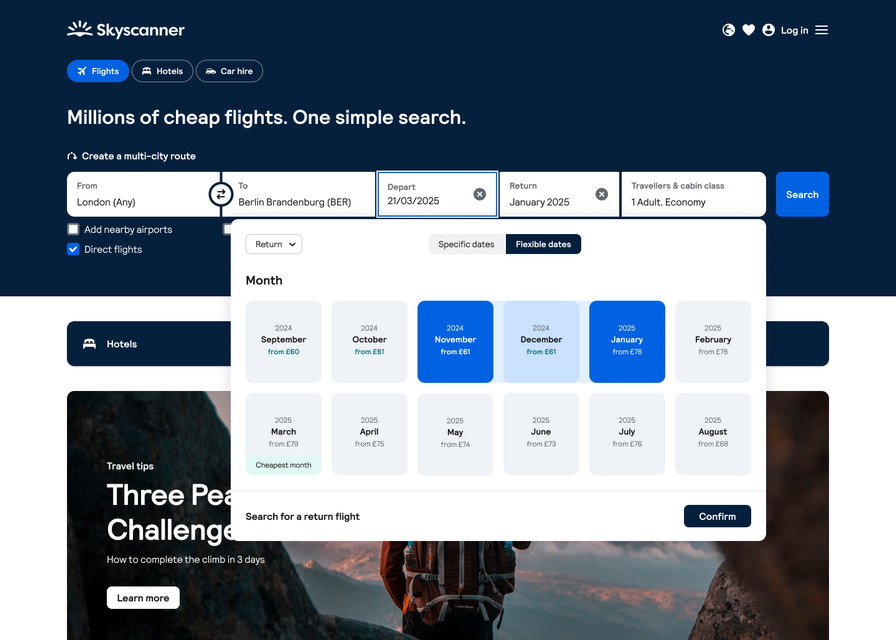
If you have a destination in mind but your dates are flexible, Whole Month search will help you find cheap air tickets on Skyscanner.
What it does
Whole Month search lets you see airfare by day. That way, if your travel dates are even a little flexible, you can shift them and save money.
How to get started
Simply enter your route, click Flexible dates, and then select the month you want to depart and return. Tap Search to pull up a handy calendar (or chart) view of the cheapest dates to fly during that month and pick your perfect travel days.
One thing to know
The airfare you see in the Whole Month calendar are estimates based on what other travelers' search results on Skyscanner in the last eight days. Use these estimates as a guide to find the ideal days for your trip, but remember that fares are dynamic and can change any time.
Multi-city search
Visit more destinations and save
When to use it
For trips with more than one destination, you'd normally need to cobble together a few one-way or roundtrip flights. Instead, use Skyscanner's Multi-city search to create a single itinerary reservation with up to six legs.
What it does
Skyscanner will find the most affordable way to book your flights in one reservation so you don't need to run a bunch of searches for separate tickets and make multiple bookings.
How to get started
In Skyscanner's flight search, change the dropdown select from Roundtrip to Multi-city and then fill out your flight details for up to six legs.
Savings Generator
See how far ahead to book your flight
When to use it
You may have a feeling that airfare for your trip itinerary is too high right now. Use the Savings Generator to find out if you should wait to book so you can pay less.
What it does
The Savings Generator tool analyzes Skyscanner's extensive flight data to show you the cheapest time to buy your flights so you can book with confidence. You’ll also see suggestions of more-affordable destinations in case your travel plans have some flexibility.
How to get started
The tool itself walks you through the steps: selecting your departure airport, when you're traveling, and where you're going.
One thing to know
Not every origin and destination are available to select. If you need inspiration for where to travel on a budget, use Everywhere search to see destinations from your home airport sorted by flight price.

Saved list
Compare your favorite flights & hotels
When to use it
Know the feeling of having a dozen tabs open trying to compare flights or hotels? Now you can close them all and use Skyscanner's Saved list feature to group all your favorite options in one place.
What it does
Your Saved lists help you compare your top picks side by side — whether it's flights or hotels — so you can narrow down your options while keeping your vacation plans organized.
How to get started
Just hit the heart icon next to any flight or hotel you love and it will be added to your Saved list. We'll also send you Price Alerts for any flights you've saved, so you can book immediately if airfare falls.
More tips for your next flight search
Other ways to find cheap air tickets on Skyscanner
Still trying to find time to plan your next trip? With the Skyscanner app, you don’t have to be in front of your laptop to get inspo or book flights, hotels, or car rentals. Stuck in a long line or waiting room? Pull out your phone and start planning. Search for flights, tap the heart to save the ones you like, and share them with your travel partner(s) while you’re on the go.
We’re inspired by the world and we want you to be too. That’s why we’re constantly adding new articles to our site to ignite your wanderlust or inform you about important updates related to travel. Find out the latest travel news, hot destinations, and more.
FAQs about finding Skyscanner cheap flights
Skyscanner can help you find the best flight, hotel, and car rental deals for your next trip.


